

Now taking founding schools for 2026/27
Three levels from one textbook page. Marking you stay in charge of.
Mentr Studio is an AI teaching assistant for English teachers in Hong Kong schools. It helps you prepare differentiated material, mark writing and speaking, and decide what to reteach. Pupils get a coach that never writes for them. You approve every step.
- Built for
- English panels, P4 to S6
- Marks to
- HKDSE and TSA rubrics
- Funding
- Fits the 「智」啟學教 grant

Hi, I'm Kai.

Why we built it
Teachers are stretched, and classes keep getting more varied.
General AI chatbots can help, but teachers end up writing prompts and checking every answer by hand. We built Mentr Studio around the work English teachers already do, with Hong Kong’s curriculum and public exams built in.
of 354 secondary teachers surveyed work more than 60 hours a week
of those teachers want more time to prepare lessons
pupils with special educational needs in public-sector schools in 2025/26, up 26.7% in five years
Sources: HKFYG Youth I.D.E.A.S. (2021); Education Bureau, DATA.GOV.HK (2026).
A week with Mentr
From your textbook page to next week’s lesson.
Prepare
Upload a textbook page, worksheet or photo. Check the text, then get linked Remedial, Regular and Elite versions with answer keys.
Assign
Approve it, then send each pupil their own level, or print booklets for class.
Mark
Writing and speaking come back marked by HKDSE or TSA domains, with a reason for every mark. Confirm or change each one.
Reteach
See the errors your class keeps making, with a short plan and a starter activity for next week.
One source, three levels
Same passage. Same goal. Three levels.
Remedial pupils get word boxes and choices. Regular pupils answer in full sentences. Elite pupils explain with evidence from the text. Every version shares one learning goal, so the whole class can still discuss the same passage together.

Learning goal: find and explain key details
Why did Grandma take the ferry?
To sell vegetables at the market.
Why did Grandma take the ferry every morning? Answer in a full sentence.
She took it to sell her vegetables in Central.
Why might Grandma prefer the ferry to the bus? Use two details from the text.
It gives her time to think, and she knows everyone at the market…

What’s inside
One platform for teachers and pupils.
Prepare
- Three levels from one sourceLinked Remedial, Regular and Elite versions with answer keys.
- Exam paper builderUniform tests, TSA-style and HKDSE-style papers with marking schemes and print views.
- Grammar sheetsOne-page sheets for every grammar point, in three support levels.
- Text types and writing plannersFeature cards for each text type, planning frames and a content, language and organisation rubric.
- Library and bookletsKeep what your panel makes, assign it again and print classroom-ready booklets.
Mark
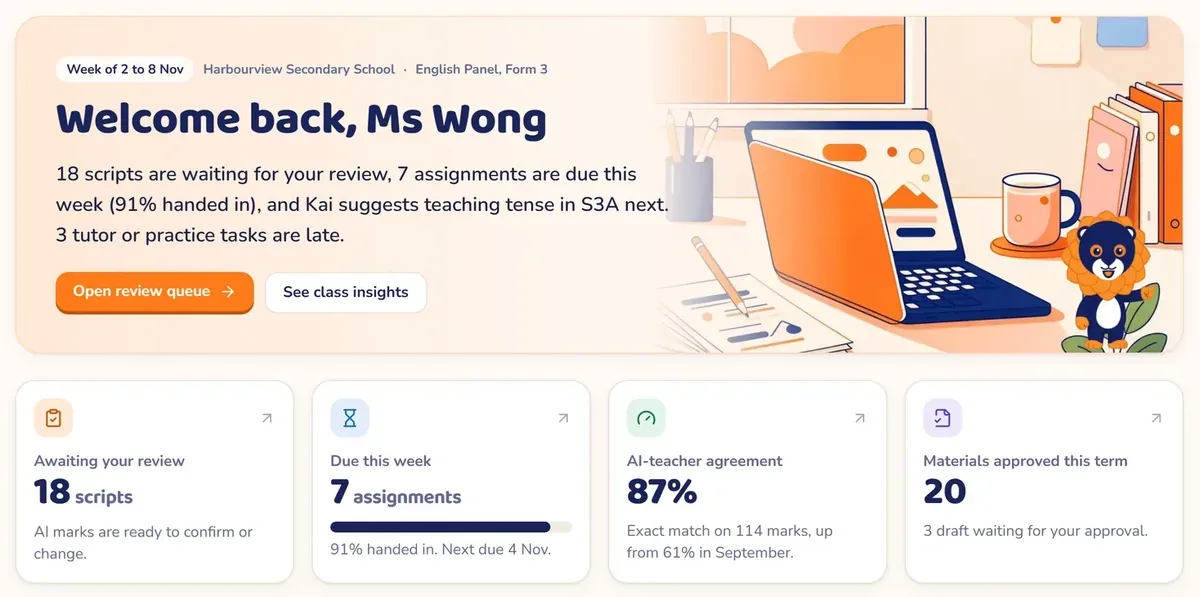
- Review queueA reason for every mark. You confirm or change it, and every decision is logged.
- Quick-MarkPaste an essay or photograph handwritten pages and get rubric marks.
- Batch markingScan a whole class set and Mentr matches each script to a pupil.
Understand and support
- Class insightsThe errors each class makes, whether reteaching is working, and what to teach next.
- Progress reportsDrafted from real marks for you to edit, approve and print for parents.
- SEN and NCS toolkitAdapted texts, support profiles and home-language glossaries for mixed classes.
Practise at their level
- Daily PathEvery task their teacher assigned, at their own level, in one place.
- Writing with KaiUnderstand the task, study a model, plan, draft and check. Kai asks questions and gives hints, but never writes for them.
- Reading skillsPassages with instant marking on objective questions.
- Speaking with AI classmatesHKDSE group discussion and TSA presentation practice by voice.
Build on their own mistakes
- AI TutorShort lessons built from their own errors: explain, worked example, guided practice, exit check.
- PracticeVocabulary, grammar and listening practice that starts where they are.
- My progressFeedback their teacher has confirmed, and what to work on next.
Primary and secondary
From P4 to S6.
Reading skills, writing genres, grammar and TSA-style speaking.
A Pre-S1 English check that links each result to practice.
Uniform tests, HKDSE-style reading, writing, listening and group discussion.
The teacher stays in charge
Nothing reaches pupils until you approve it.
Mentr drafts and suggests. Teachers decide.

- You approve every materialDrafts stay drafts until a teacher signs them off.
- You have the final say on marksEvery AI mark comes with a reason and can be changed. Mentr shows how often you agree with it.
- Pupils’ work stays their ownKai asks questions and gives hints. It does not write for them.
- Pupil data handled with careEach pilot uses class login codes, no personal email addresses, and a data note agreed with the school.
「智」啟學教 grant per school
EDB’s AI for Empowering Learning and Teaching Funding Programme gives each public-sector school a one-off grant to spend by 31 August 2028. Every Mentr Studio plan is priced to fit inside it. The school decides how to use its grant.
Pricing
Priced per school year.
These are starting figures. We send an exact quotation after the demo, once we know your classes.
| Plan | What is included | From |
|---|---|---|
| Founding school pilot | One form, January to June 2027, with onboarding, a mid-point review and an impact report.Limited places | Free |
| Form licence | One form’s English teachers and pupils, all core features, onboarding included. | FromHK$18,000 |
| Whole-school English licence | Every English teacher and pupil, all core features, onboarding and a termly review. | FromHK$36,000 |
| SEN and NCS module | Add-on to any licence: adapted texts, support profiles and home-language glossaries. | FromHK$6,000 |
| Teacher training | 2-hour on-site AI workshop for your teachers. | FromHK$4,800 |
All prices in Hong Kong dollars, per school year unless stated. Travel for on-site sessions is included.
Questions teachers ask
Before you book.
Does Mentr Studio replace the teacher’s judgement?
No. It drafts and suggests. Teachers approve every material before pupils see it, and confirm or change every mark.
Can pupils use it to write their essays for them?
No. Kai asks questions, points to the task and gives hints. The words pupils submit are their own.
Does it work with our own textbooks?
Yes. You start from the page you already teach: upload a textbook page, a worksheet, a photo or a PDF, and check the text before anything is built.
Is it for primary or secondary schools?
Both. It covers P4 to S6, with TSA-style work for primary and HKDSE-style work for secondary, plus a Pre-S1 check for P6.
What devices do we need?
A browser. Teachers use a laptop or desktop. Pupils can use school iPads, tablets or computers. There is nothing to install.
How is pupil data protected?
Before any pupil uses Mentr, we agree a short data note with the school covering what is collected, where it is stored and when it is deleted. Pupils sign in with class login codes, not personal email addresses.
Can we pay with the 「智」啟學教 grant?
Every plan is priced to fit inside it. Each school decides, under the programme’s guidelines, how to use its grant.
What happens after the free pilot?
Nothing continues unless your school chooses. In June you get an impact report, and you decide whether to take a licence.
Book an online demo
See Mentr Studio in 30 minutes, online.
We walk your panel through it using one of your own textbook pages. Tell us a little about your school and two or three times that suit you.
- Fill in the form
- We confirm a time by email
- 30-minute online demo
- Quotation if you want one